
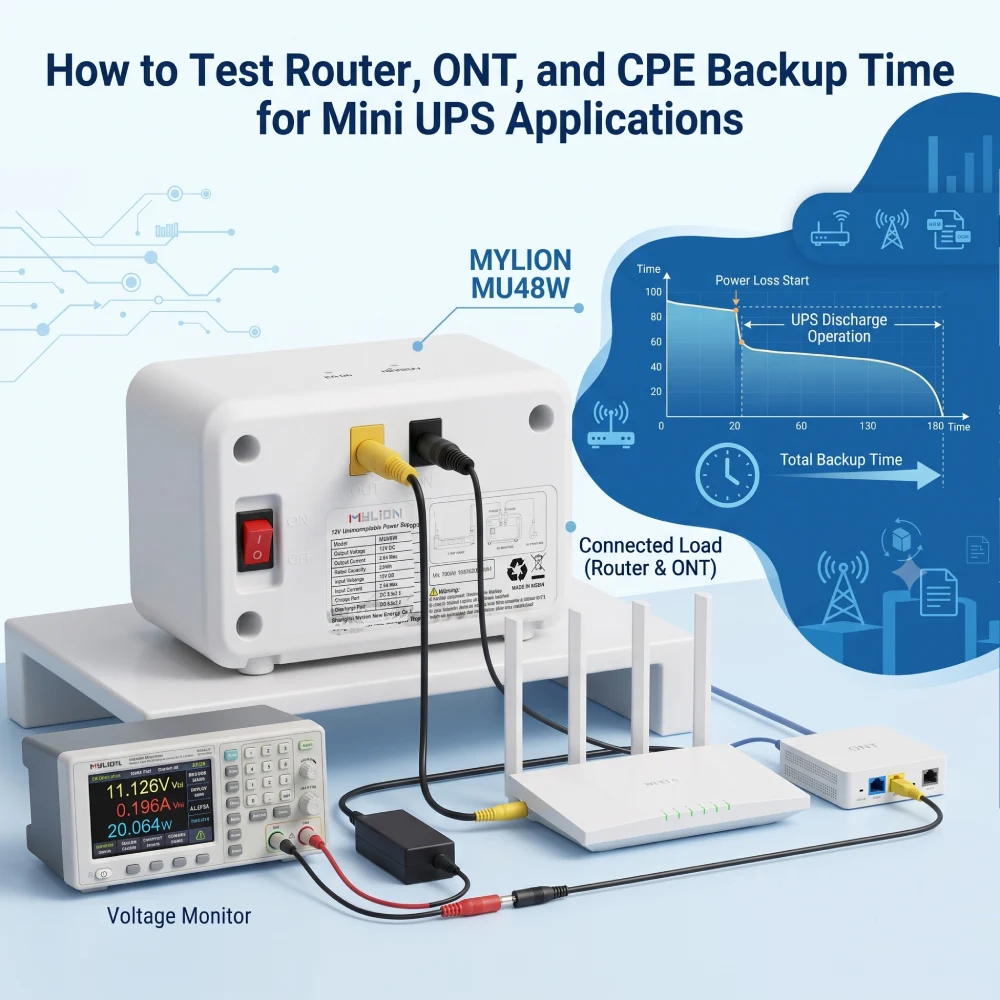
Le temps de sauvegarde est un facteur essentiel lors de l'évaluation. Solutions Mini UPS Pour les routeurs, ONT, ONU et CPE. Cependant, l'autonomie réelle ne dépend pas uniquement de la capacité de la batterie. La puissance de charge, le rendement de sortie, les exigences du périphérique et les conditions de test influent également sur le résultat final.
Pour les fournisseurs d'accès Internet, les opérateurs de télécommunications, les fabricants d'équipements réseau et les intégrateurs de systèmes, des tests précis de durée d'autonomie permettent de vérifier si une solution Mini UPS peut maintenir la connectivité réseau lors de coupures de courant.
MYLION Solutions Mini UPS Ces onduleurs sont conçus pour les applications alimentées en courant continu, telles que les routeurs, les ONT, les ONU, les CPE, les passerelles, les systèmes de vidéosurveillance et les objets connectés. Une évaluation fiable doit prendre en compte l'ensemble du système d'alimentation, y compris l'adaptateur, le mini-onduleur, la batterie, les conditions de sortie et les équipements connectés.
Pourquoi des tests précis de durée de sauvegarde sont importants pour les équipements réseau
Contrairement aux ordinateurs ou aux écrans, les routeurs et les ONT fonctionnent 24 h/24 et 7 j/7, mais consomment relativement peu d'énergie (généralement entre 5 et 15 W au total). Cependant, ils sont très sensibles aux baisses de tension. Une diminution ou une coupure de courant soudaine peut entraîner des pannes de service nécessitant l'intervention d'un technicien.
Des tests précis de la durée de sauvegarde vous aident à :
- Déterminez si un Mini UPS peut survivre à une panne locale typique (5 à 10 minutes pour les scintillements, 30 à 60 minutes pour les pannes courtes ou 2 à 4 heures pour les événements prolongés).
- Évitez de surpayer pour des batteries surdimensionnées.
- Prévoyez des coupures prolongées en vous associant à des générateurs ou à des centrales électriques plus importantes.
Comprendre la consommation électrique de votre équipement réseau
Avant de pouvoir tester ou calculer l'autonomie de la batterie, il est essentiel de bien comprendre les appareils alimentés. Tous les périphériques réseau ne consomment pas autant d'énergie qu'une seule batterie de secours ; les regrouper sur ce type d'appareil nécessite donc de connaître précisément leur consommation respective.
Définition de vos périphériques réseau
- Routeurs :Les routeurs gèrent les adresses IP locales, diffusent le Wi-Fi et acheminent les données. Les routeurs haut débit modernes (notamment les modèles Wi-Fi 6/6E) sont dotés de processeurs puissants qui consomment davantage d'énergie que les modèles de génération précédente.
- ONT (Terminaux de réseau optique) : Utilisé dans les installations de fibre optique jusqu'au domicile (FTTH). Le boîtier ONT convertit le signal lumineux du câble à fibre optique en un signal Ethernet électrique compréhensible par votre routeur.
- CPE (Équipement chez le client) :Terme générique désignant tout équipement réseau appartenant au fournisseur et installé chez le client. Cela inclut les modems DSL, les ONT, les passerelles standard et même les petits serveurs périphériques.
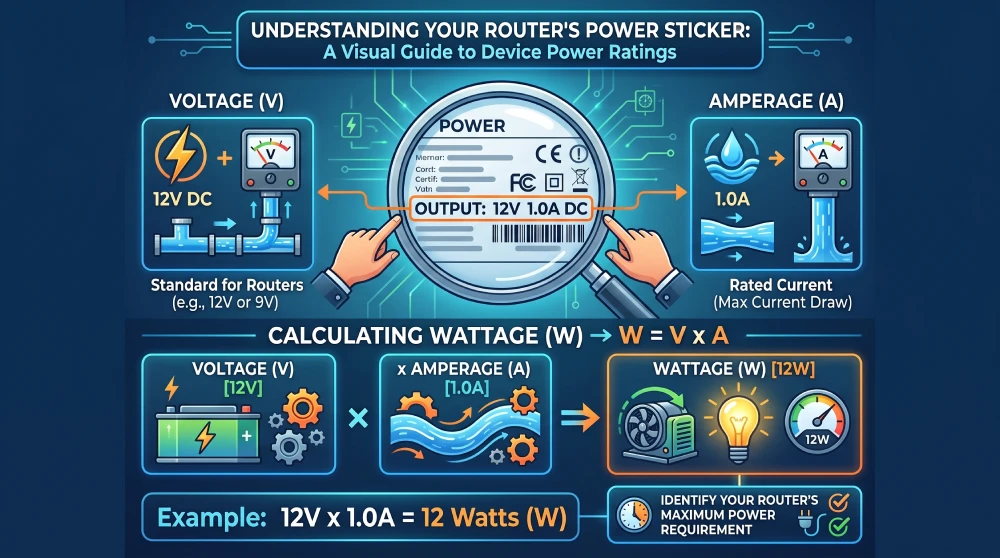
Comment lire les valeurs de puissance des appareils
Pour tester l'autonomie de la batterie, repérez l'étiquette d'alimentation située sous ou à l'arrière de votre appareil (ou sur son adaptateur secteur). Trois indicateurs clés sont à vérifier :
- tension:La tension électrique requise par l'appareil. La plupart des routeurs grand public et des routeurs de réseau périphérique fonctionnent en 12 V ou 9 V CC.
- Intensité de courant:Le courant électrique maximal que l'appareil est conçu pour absorber.
- Puissance :La puissance totale consommée.
Calculez la puissance théorique maximale à l'aide de cette formule simple :
W = V × UN
Par exemple, un routeur standard 12V 1A a une consommation électrique théorique maximale de 12 watts.
Cependant, il s'agit de la consommation maximale, et non de la consommation moyenne. Un routeur d'une puissance nominale de 12 W peut ne consommer que 5 W en fonctionnement normal. C'est précisément pour cette raison que des tests physiques sont nécessaires.
Guide étape par étape : Comment tester l’autonomie de secours des routeurs, ONT et CPE
Étape 1 : Mettre en place un environnement de test contrôlé en conditions réelles
Pour connaître votre autonomie réelle, vous devez simuler une panne de courant.
- Assurez-vous que le Mini UPS est chargé à 100%. (Vérifiez les indicateurs de capacité LED).
- Connectez votre routeur et/ou ONT à l'onduleur en utilisant les ports de sortie CC appropriés (par exemple, en faisant correspondre la sortie 12V à un routeur 12V).
- Le mini-onduleur devrait fonctionner normalement lorsqu'il est branché sur secteur, garantissant ainsi un démarrage normal des appareils.
Étape 2 : Démarrer le test de coupure de courant
- Débranchez l'entrée AC/DC et observez si l'appareil connecté :
- Reste en ligne sans redémarrage (acceptable)
- Réinitialisations brèves (inacceptables pour de nombreuses applications FAI)
- Indique une chute de tension ou une instabilité pendant le transfert (utiliser un oscilloscope si disponible).
MYLION Mini-onduleur Ces unités sont dotées d'une commutation sans délai (0 ms), assurant une alimentation ininterrompue aux appareils connectés sans aucun temps d'arrêt pendant les coupures de courant.
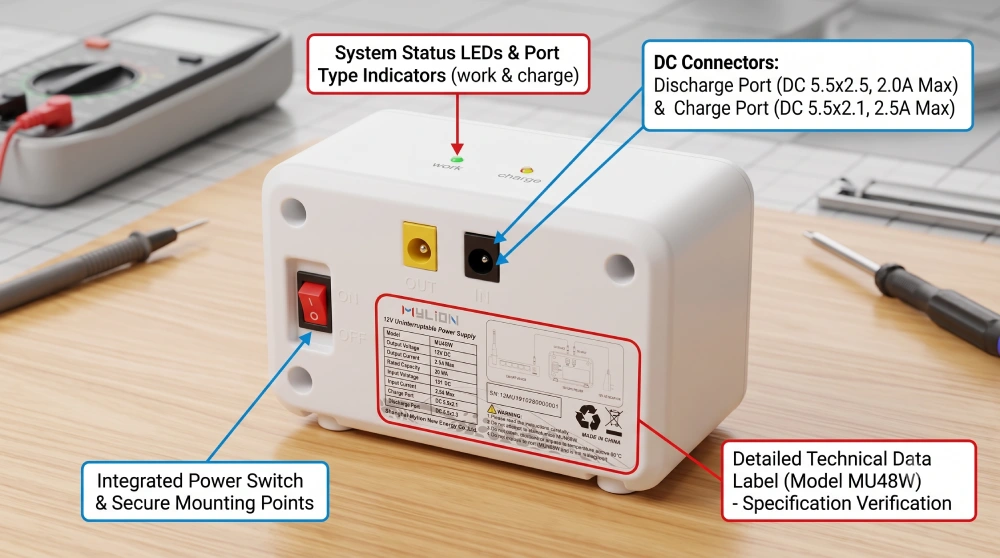
Étape 3 : Simulation d’une charge réseau normale
Débranchez l'onduleur de la prise murale. Notez l'heure exacte.
Détail crucial : ne laissez pas le réseau inactif. Le matériel réseau consomme beaucoup plus d’énergie lors du traitement de paquets de données volumineux. Pour simuler une charge réaliste d’une journée de travail :
- Diffusez une vidéo 4K ou effectuez un test de ping continu sur un ordinateur connecté.
- Lancer le téléchargement d'un fichier volumineux.
- Assurez-vous que plusieurs appareils (téléphones, ordinateurs portables, hubs domotiques) restent connectés au Wi-Fi.
Étape 4 : Surveiller, enregistrer et évaluer
Laissez les appareils fonctionner exclusivement sur batterie jusqu'à ce que le réseau soit interrompu. Notez l'heure exacte à laquelle le routeur s'éteint.
Comparez cette durée d'exécution réelle à votre calcul théorique. Dans de nombreux cas, la durée réelle sera supérieure à la durée théorique calculée à partir des indications de l'alimentation, car le routeur consomme rarement son ampérage maximal nominal.
Facteurs clés influençant la durée réelle de l'autonomie de votre onduleur
Si les résultats de vos tests physiques diffèrent considérablement de vos calculs, plusieurs variables sont probablement en jeu.
1. Capacité de la batterie
Le facteur déterminant fondamental. Il faut toujours comparer en Wh, et non en mAh ou Ah uniquement.
2. Puissance de charge de l'appareil
La consommation d'énergie varie considérablement d'un appareil à l'autre : un ONT de base peut consommer 2 W, tandis qu'un routeur d'entreprise peut consommer 25 W.
3. Efficacité de l'onduleur
Les mini-onduleurs CC atteignent généralement un rendement de 90 à 951 TP3T. Cette perte de rendement doit être prise en compte dans les calculs.
4. Profondeur de déversement (DoD)
Pour les batteries au lithium, la capacité utile n'est pas égale à 100% de la capacité nominale. Des hypothèses prudentes du Département de la Défense garantissent des prévisions d'autonomie fiables.
5. Température et ventilation
Les propriétés chimiques des batteries varient selon la température. Une mauvaise ventilation peut accélérer la dégradation de leur capacité lors de la décharge.
6. Âge de la batterie
L'autonomie diminue avec le vieillissement des batteries. Effectuez des tests avec des unités neuves pour obtenir une valeur de référence, mais tenez compte de la dégradation au cours du cycle de vie du produit.
Comment le mini-onduleur MYLION prend en charge les applications de secours en télécommunications
Pour les opérateurs télécoms, les fournisseurs d'accès internet et les fabricants d'équipements réseau, une solution d'alimentation sans coupure (Mini UPS) fiable exige bien plus qu'une simple capacité de batterie. Les solutions Mini UPS de MYLION sont conçues pour les routeurs, les ONT, les ONU, les CPE, les passerelles et autres appareils de communication alimentés en courant continu, contribuant ainsi à réduire les interruptions de service dues aux coupures de courant.
Les principaux avantages comprennent :
- Conception à temps de transfert nul (0 milliseconde): Permet une commutation d'alimentation sans interruption afin de maintenir le fonctionnement de l'appareil pendant les coupures de courant.
- Chimie avancée: Utilise des technologies de batterie et des systèmes de protection adaptés pour assurer des performances de secours fiables et un fonctionnement à long terme.
- Sortie multi-appareils: Prend en charge des configurations flexibles pour les applications nécessitant une alimentation de secours pour plusieurs appareils connectés, comme les combinaisons ONT et routeur.
- Sécurité surdimensionnée: Fournit une marge de puissance et une conception de protection appropriées pour améliorer la fiabilité du système et réduire les risques opérationnels.
- Une variété de produits de durée de sauvegardes: Offre différentes options de capacité et de configuration pour répondre aux diverses exigences de temps de sauvegarde pour les réseaux domestiques, les déploiements FAI et les applications de télécommunications.
MYLION Modèle Mini UPS | Capacité de la batterie | Temps de sauvegarde : 6Charge W (Routeur de base) | Durée de sauvegarde : 18Charge W (Routeur + ONT) | Temps de sauvegarde : 24Charge W (Configuration à trafic élevé) |
77,7 Wh | ~10 heures | ~5 heures | ~3 heures | |
44,4 Wh | ~7 heures | ~3 heures | ~2 heures | |
29,6 Wh | ~4 heures | Environ 1,5 heure | ~1 heure |
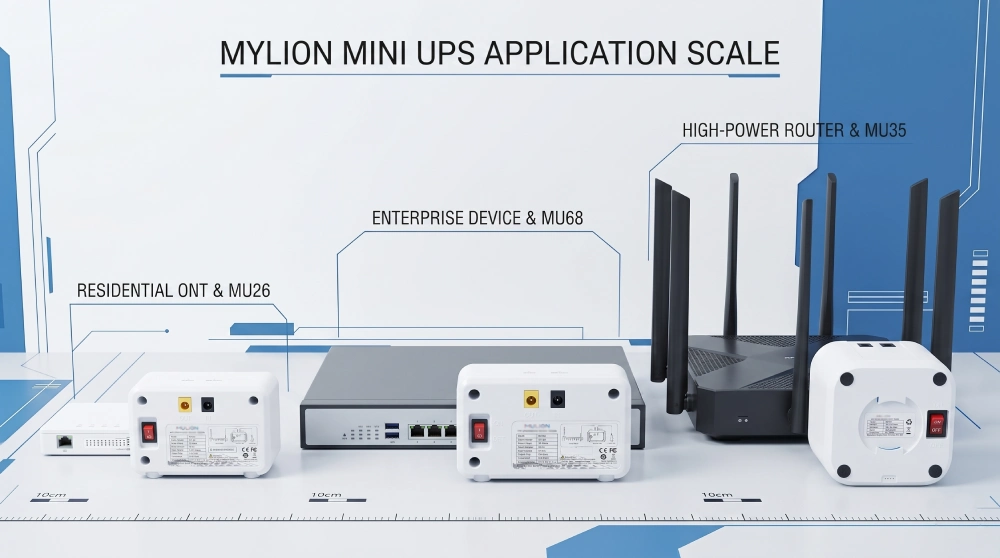
MYLION accompagne ses clients depuis l'évaluation des applications et l'adéquation des produits jusqu'aux tests d'échantillons et au déploiement des projets, contribuant ainsi à la mise en place de solutions de sauvegarde télécoms fiables.
FAQ
Q1 : Pourquoi ne dois-je pas utiliser l’étiquette de l’adaptateur secteur pour calculer la durée de l’autonomie ?
Q2 : Quelle est la différence entre Ah et Wh ?
Q3 : Combien de fois dois-je répéter un test de temps de sauvegarde ?
Q4 : Que dois-je faire si le résultat du test d’échantillon n’est pas conforme aux attentes ?
Q5 : Comment Mylion garantit-il la précision des temps de sauvegarde ?
Q6 : L’onduleur Mylion Mini UPS peut-il alimenter plusieurs appareils simultanément ?
Conclusion
Pour les opérateurs télécoms, les fournisseurs d'accès Internet et les fabricants d'équipements réseau, une validation précise de la durée de l'alimentation de secours permet de garantir que les solutions Mini UPS répondent aux exigences réelles de déploiement et prennent en charge la continuité des services réseau.
MYLION fournit Solutions Mini UPS pour les applications de communication et de réseau alimentées en courant continu, aidant les clients B2B à évaluer la compatibilité des appareils, à valider les performances de secours et à développer des solutions d'alimentation de secours fiables.

 Français
  English
  简体中文
简体中文  Deutsch
  Italiano
  Español