
Pour les fournisseurs d'accès Internet et les distributeurs de matériel B2B, la fiabilité d'un réseau repose souvent sur ses plus petits composants. Si les connexions fibre multi-gigabits et les routeurs Wi-Fi professionnels sont au cœur des discussions, la connexion électrique physique est le véritable garant de la disponibilité du réseau. Plus précisément, Connecteur cylindrique CC.
Le raccordement d'un routeur ou d'un ONT à une source d'alimentation fiable exige une compatibilité matérielle précise. Un écart, même de quelques fractions de millimètre, peut entraîner des connexions défectueuses, des arcs électriques ou une panne matérielle complète.
Ce guide vous explique précisément comment identifier la taille du connecteur cylindrique CC adaptée aux routeurs, ONT et autres équipements réseau, afin que vous puissiez trouver l'adaptateur de remplacement adéquat ou choisir le bon appareil. Mini-onduleur pour alimentation de secours.
Comprendre l'importance des connecteurs cylindriques CC dans la mise en réseau
Un connecteur cylindrique CC, également appelé connecteur d'alimentation coaxial, est la norme industrielle pour la distribution d'énergie basse tension à partir d'un adaptateur secteur/CC vers les appareils électroniques grand public et professionnels.
Dans le domaine des télécommunications, les routeurs, les ONT, les modems et les injecteurs PoE (Power over Ethernet) dépendent presque exclusivement de ces connecteurs.
Pourquoi est-il important de déterminer la taille exacte de votre infrastructure informatique ?
- Protection matérielle : Forcer l'insertion d'un connecteur trop petit peut endommager la broche centrale de votre routeur. À l'inverse, utiliser une fiche dont le diamètre intérieur est trop grand entraînera une connexion intermittente.
- Normalisation des infrastructures :Pour les déploiements B2B, connaître précisément vos besoins en énergie vous permet de standardiser les systèmes d'alimentation de secours sur des centaines de sites de bureaux ou d'installations clients.
- Préparation aux situations d’urgence :En cas de panne d'un adaptateur secteur ou lors de l'intégration d'un système de batterie de secours, vous devez connaître immédiatement les spécifications exactes de la prise afin de trouver un remplacement compatible et de minimiser les temps d'arrêt coûteux.
Qu'est-ce qu'un connecteur cylindrique CC ?
Le connecteur cylindrique CC est le connecteur d'alimentation le plus courant dans l'électronique grand public et professionnelle.
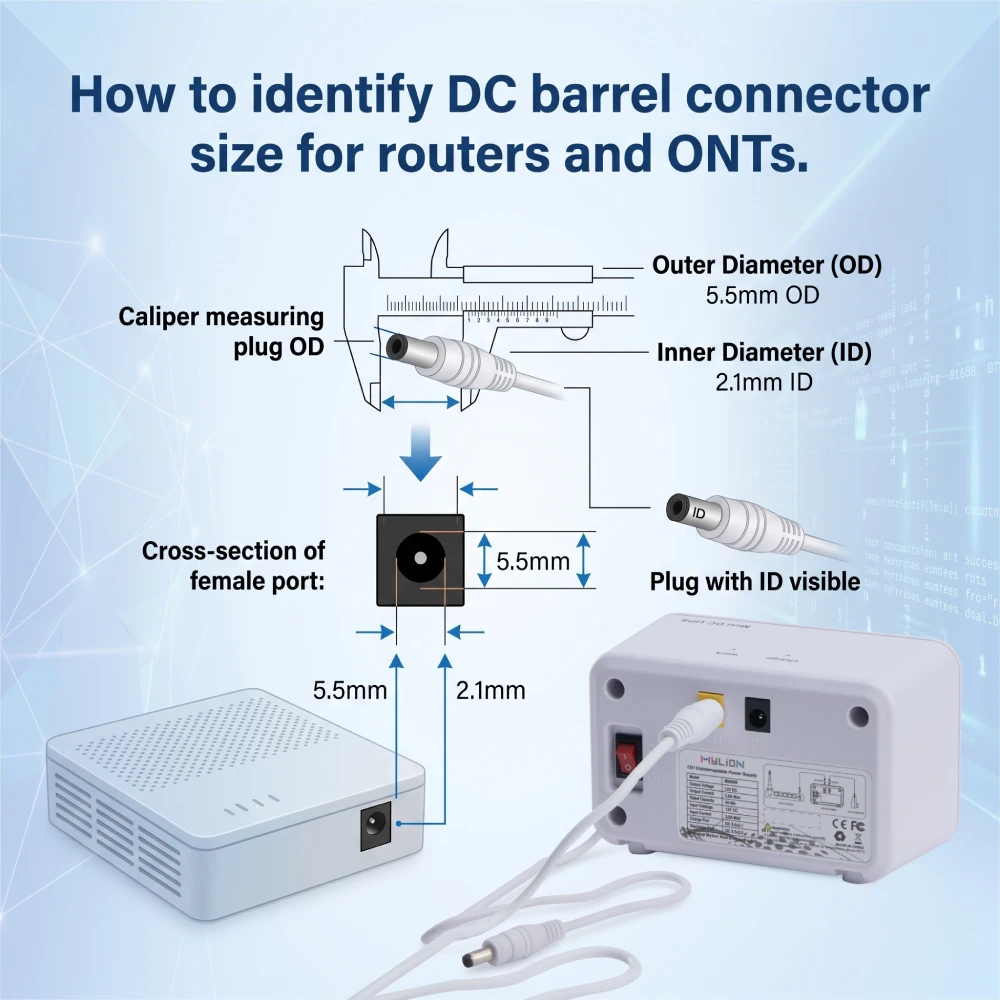
- Diamètre extérieur (DE) : Il s'agit de la mesure sur toute la circonférence extérieure du corps cylindrique métallique.
- Diamètre intérieur (DI) : Il s'agit de la mesure du diamètre intérieur creux du canon.
- Centre Pdans: La broche à l'intérieur du cylindre (généralement positive dans la plupart des appareils électroniques grand public)
Lorsqu'un fabricant indique la taille d'un connecteur, elle est presque toujours présentée sous la forme suivante : Diamètre extérieur x diamètre intérieurPar exemple, un connecteur « 5,5 x 2,1 mm » a un diamètre extérieur de 5,5 mm et un diamètre intérieur de 2,1 mm.
Tailles courantes des connecteurs cylindriques CC pour routeurs et ONT
Bien qu'il existe des dizaines de variantes de connecteurs cylindriques sur le marché, l'industrie des télécommunications et des réseaux s'est largement consolidée autour de quelques tailles standard.
Dimensions (DE x DI) | Applications courantes |
5,5 x 2,1 mm | La norme mondiale pour la plupart des routeurs grand public et B2B, des commutateurs réseau et des ONT standard. |
5,5 x 2,5 mm | Équipements informatiques haute performance, routeurs robustes et périphériques NAS de grande capacité. |
3,5 x 1,35 mm | Points d'accès compacts, caméras IP basiques et convertisseurs de média fibre optique compacts. |
4,0 x 1,7 mm | Certains modems propriétaires de FAI et ONT localisés pour le marché asiatique. |
Comprendre ces dimensions standard permet de réduire immédiatement les possibilités. Si vous utilisez un routeur de bureau standard d'une grande marque, il y a de fortes chances qu'il s'agisse d'une prise jack 5,5 x 2,1 mm.
Guide étape par étape : Comment mesurer avec précision la taille de votre connecteur CC
Lors de l'audit du matériel pour le déploiement à grande échelle d'onduleurs, il est impératif d'éviter de deviner la taille des connecteurs. Voici comment les professionnels de l'informatique mesurent avec précision les connecteurs cylindriques CC.
Étape 1 : Consulter la fiche technique du fabricant
Avant d'utiliser un outil, consultez la fiche technique officielle. Repérez la section « Alimentation » ou « Spécifications matérielles » du manuel. Les fournisseurs B2B indiquent souvent les dimensions exactes des prises pour faciliter le travail des intégrateurs système.
Étape 2 : Utiliser un pied à coulisse numérique
Il s'agit de la méthode physique la plus fiable.
- Pour mesurer le diamètre extérieur :Serrez délicatement les mâchoires extérieures du pied à coulisse autour du corps métallique de la fiche mâle.
- Pour mesurer le diamètre intérieur :Utilisez les mâchoires intérieures supérieures, plus petites, du pied à coulisse. Insérez-les dans l'extrémité creuse du connecteur mâle et écartez-les délicatement jusqu'à ce qu'elles touchent les parois internes. Lisez la mesure en millimètres.
Étape 3 : Vérifiez le port d'alimentation de l'appareil
Examinez la prise d'alimentation de votre routeur ou ONT. Certains fabricants indiquent la taille du connecteur requis ou la polarité directement à côté du port.
Vous pouvez également effectuer un essai de compatibilité avec des connecteurs connus :
- Un bouchon de 2,1 mm doit s'insérer facilement et être bien ajusté.
- Une fiche de 2,5 mm semblera avoir du jeu dans une prise jack de 2,1 mm.
Au-delà de la taille : la polarité et la compatibilité de tension sont importantes
Trouver la bonne taille physique ne représente que la moitié du travail. Pour protéger votre coûteux équipement réseau contre les dommages électriques catastrophiques, vous devez également vérifier la tension, l'ampérage et la polarité.
- Polarité: Consultez l'autocollant sur votre adaptateur secteur actuel pour trouver le symbole de polarité. Il ressemble à un cercle avec un point indiquant le pôle positif (+) ou négatif (-) au centre.
- Tension (V) :Votre alimentation de secours doit fournir la tension exacte requise par votre routeur (généralement 9V ou 12V).
- Ampérage (A) : L'alimentation électrique doit pouvoir fournir au moins l'ampérage demandé par l'appareil (par exemple, 1 A, 1,5 A, 2 A).
Garantir une alimentation sans interruption : intégrer un mini-onduleur à votre équipement
Si vous déployez une alimentation de secours pour les routeurs et les ONT (courante dans les projets FAI, télécommunications et FTTH), la taille du connecteur devient une décision d'achat cruciale.
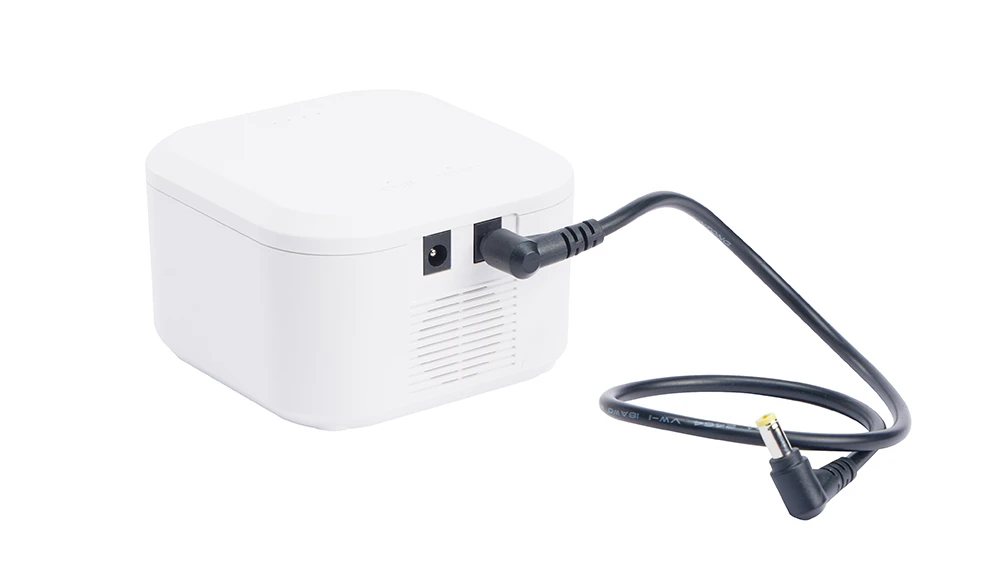
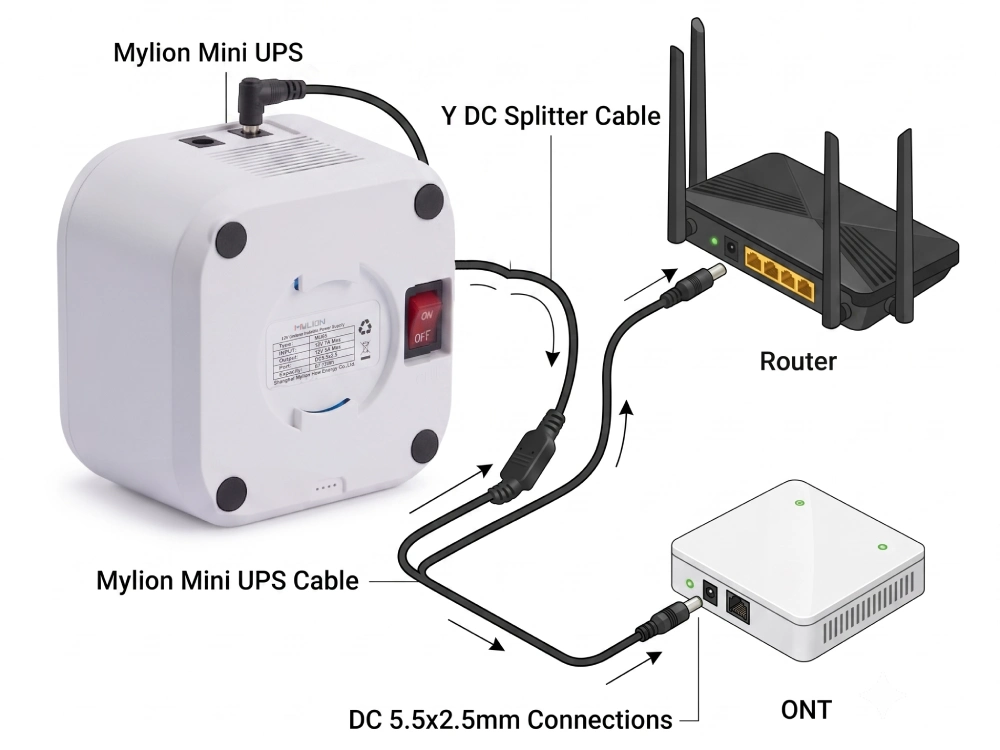
Un mini onduleur Il se connecte directement à votre routeur ou ONT via un connecteur cylindrique CC. Contrairement aux systèmes UPS CA traditionnels qui convertissent le courant continu en courant alternatif et inversement, un Onduleur mini CC offre un chemin direct CC-CC pour une efficacité accrue.
Comment Mylion Mini UPS résout les problèmes de compatibilité des connecteurs
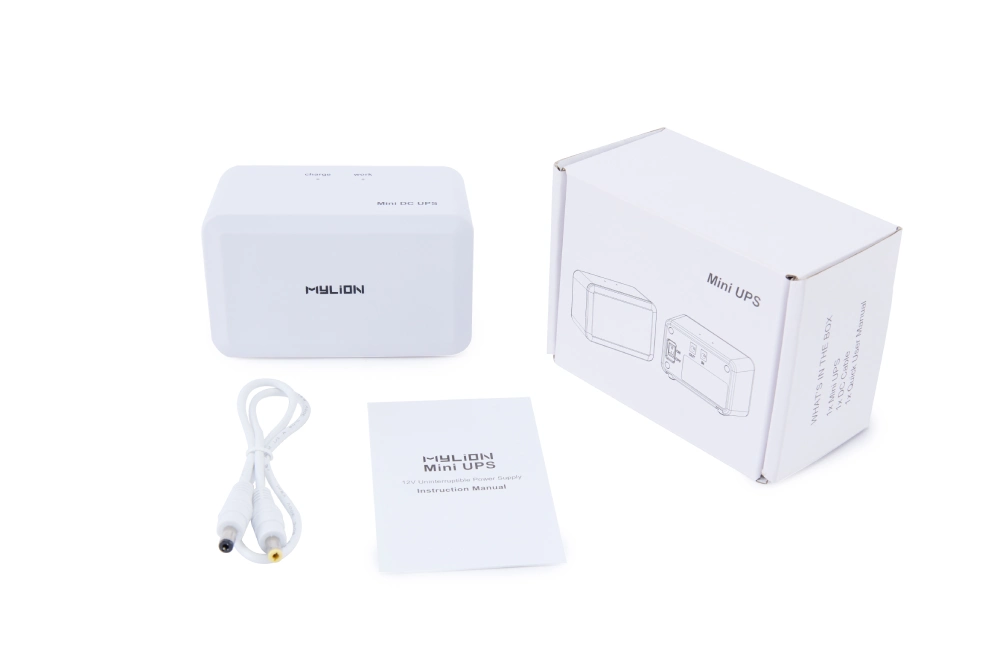
Pour les distributeurs B2B et les équipes d'approvisionnement informatique, trouver un onduleur compatible avec un parc hétérogène de routeurs et d'ONT peut s'avérer un véritable casse-tête logistique. Les systèmes d'onduleurs Mylion Mini sont conçus spécifiquement pour simplifier la tâche.
Voici comment les produits Mylion simplifient les déploiements de sauvegarde réseau :
1. Kits d'adaptateurs universels
Mini-onduleur Mylion fournit une sortie CC régulée de 12 V via des connecteurs cylindriques standard, généralement de 5,5 mm × 2,1 mm ou 5,5 mm × 2,5 mm.
Que votre FAI vous ait fourni un ONT avec une prise standard de 5,5 x 2,1 mm ou un routeur plus ancien nécessitant une prise de 5,5 x 2,5 mm, Mylion fournit les adaptateurs élévateurs ou abaisseurs directement dans la boîte.
2. Ports de sortie multi-tension
Les réseaux d'entreprise utilisent souvent des appareils distincts empilés ensemble, par exemple un routeur 12V associé à un ONT fibre 9V.
Modèles d'onduleurs Mylion Mini Il est doté de sorties multitensions intelligentes (5 V/9 V/12 V). Cela vous permet d'alimenter plusieurs appareils nécessitant des tensions différentes à partir d'une seule unité de secours compacte.
3. Temps de transfert nul
Les systèmes Mylion fonctionnant exclusivement en courant continu, le temps de transfert en cas de coupure de courant est instantanément instantané. Les composants internes sensibles de votre routeur ne subissent aucune baisse de tension, et vos appels VoIP ainsi que vos sessions VPN à distance restent parfaitement stables.
4. Batteries au lithium haute capacité
Conçue pour résister aux exigences d'une utilisation B2B, Mylion intègre des cellules lithium-ion haut de gamme qui offrent des heures d'autonomie continue, garantissant ainsi la survie de votre réseau lors de pannes de réseau prolongées, et non pas seulement lors de brèves interruptions.
5. Personnalisation OEM
Pour les déploiements FAI et télécoms, Mylion propose des options de personnalisation OEM permettant aux acheteurs de spécifier précisément les exigences. types de connecteurs. Y compris:
- Connecteurs cylindriques CC de 2,1 mm ou 2,5 mm,
- USB-A
- USB-C
- Connecteurs propriétaires.
Cela évite les interventions sur le terrain et garantit que les groupes électrogènes de secours se branchent directement sur l'équipement existant sans adaptateurs.
En standardisant vos déploiements réseau avec Mylion, vous éliminez les incertitudes liées à la compatibilité des connecteurs CC et garantissez une disponibilité sans faille pour vos utilisateurs finaux.
FAQ
Q1 : Puis-je utiliser une fiche de 2,5 mm dans une prise jack de 2,1 mm ?
Q2 : Comment savoir si mon appareil est à centre positif ou à centre négatif ?
Q3 : Que faire si la taille de mon connecteur n'est pas de 5,5 mm ?
Q4 : La taille du connecteur a-t-elle une incidence sur la puissance délivrée (tension/courant) ?
Q5 : Un mini-onduleur peut-il fonctionner avec n’importe quel routeur si j’utilise le bon connecteur ?
Conclusion
Identifier la taille correcte du connecteur cylindrique CC pour votre routeur ou ONT est essentiel pour maintenir la disponibilité du réseau. En comprenant le diamètre extérieur, le diamètre intérieur et la polarité, vous protégez votre matériel contre les dommages et assurez une alimentation électrique stable et fiable.
Pour les intégrateurs de systèmes, les fournisseurs d'accès Internet et les opérateurs télécoms déployant des solutions d'alimentation de secours à grande échelle, la compatibilité des connecteurs est une étape incontournable du processus d'approvisionnement. En associant cette connaissance à une Solution de sauvegarde MYLION DC, vous protégez ainsi votre réseau des instabilités du réseau électrique.



 Français
  English
  简体中文
简体中文  Deutsch
  Italiano
  Español