
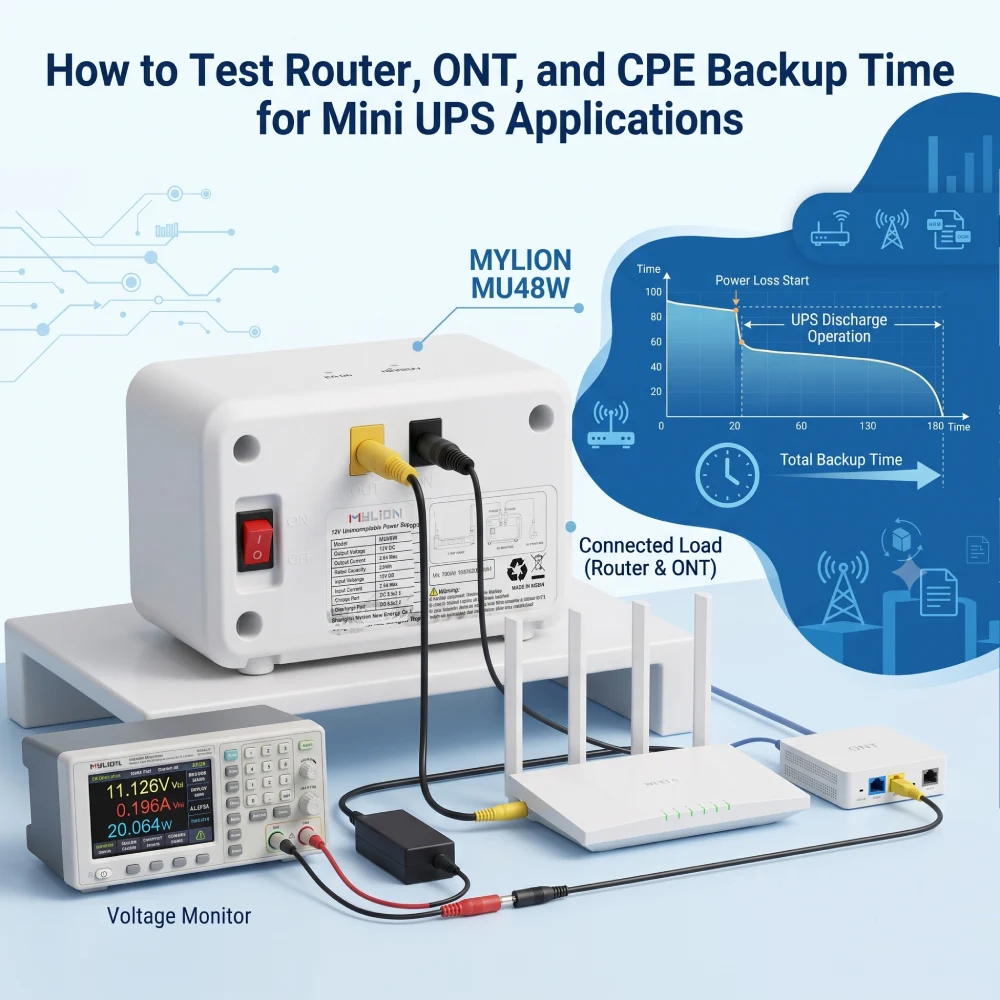
Il tempo di backup è un fattore critico nella valutazione Soluzioni Mini UPS per router, ONT, ONU e dispositivi CPE. Tuttavia, l'autonomia effettiva non è determinata solo dalla capacità della batteria. La potenza di carico, l'efficienza di uscita, i requisiti del dispositivo e le condizioni di test influiscono sul risultato finale.
Per i provider di servizi Internet (ISP), gli operatori di telecomunicazioni, i produttori di apparecchiature di rete e gli integratori di sistemi, test accurati del tempo di backup aiutano a verificare se una soluzione Mini UPS è in grado di mantenere la connettività di rete durante le interruzioni di corrente.
MIO LEONE Soluzioni Mini UPS Sono progettati per applicazioni alimentate in corrente continua come router, ONT, ONU, CPE, gateway, sistemi CCTV e dispositivi IoT. Una valutazione affidabile dovrebbe considerare l'intero sistema di alimentazione, inclusi l'adattatore, il mini UPS, la batteria, le condizioni di uscita e le apparecchiature collegate.
Perché è importante testare con precisione i tempi di backup delle apparecchiature di rete.
A differenza di computer o monitor, router e ONT funzionano 24 ore su 24, 7 giorni su 7, ma consumano relativamente poca energia, in genere tra 5W e 15W combinati. Tuttavia, sono molto sensibili ai cali di tensione. Un calo di tensione o un'improvvisa interruzione di corrente possono innescare una serie di guasti che richiedono l'intervento di tecnici per essere risolti.
Un test accurato dei tempi di backup ti aiuta a:
- Verifica se un Mini UPS è in grado di resistere a una tipica interruzione di corrente locale (5-10 minuti per sbalzi di tensione, 30-60 minuti per brevi interruzioni o 2-4 ore per eventi prolungati).
- Evitate di pagare troppo per batterie sovradimensionate.
- Pianificate interruzioni di corrente prolungate collegandovi a generatori o centrali elettriche più grandi.
Comprendere il consumo energetico delle apparecchiature di rete
Prima di poter testare o calcolare l'autonomia della batteria di backup, è necessario comprendere esattamente quali dispositivi si stanno alimentando. Non tutti i dispositivi di rete sono uguali e raggrupparli su un'unica batteria di backup richiede una chiara comprensione del loro consumo energetico individuale.
Definizione dei dispositivi di rete
- Router:I router gestiscono gli indirizzi IP locali, trasmettono il Wi-Fi e instradano i dati. I moderni router ad alta velocità (in particolare i modelli Wi-Fi 6/6E) dispongono di processori potenti che richiedono più energia rispetto ai modelli di vecchia generazione.
- ONT (Terminali di rete ottica): Utilizzato nelle configurazioni FTTH (Fiber-to-the-Home). L'ONT converte il segnale luminoso ottico proveniente dal cavo in fibra ottica nel segnale elettrico Ethernet comprensibile al router.
- CPE (Apparecchiature installate presso la sede del cliente):Un termine generico che indica qualsiasi apparecchiatura di rete di proprietà del provider situata presso la sede del cliente. Ciò include modem DSL, ONT, gateway standard e persino piccoli server edge.
Come leggere i valori di potenza di un dispositivo
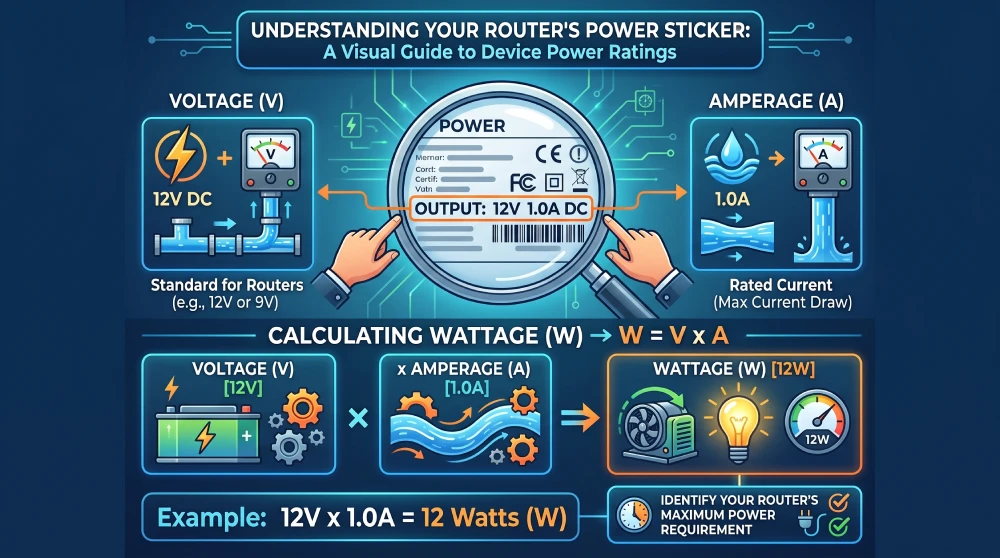
Per testare il tempo di backup, è necessario individuare l'etichetta di alimentazione sul fondo o sul retro del dispositivo (oppure sull'alimentatore CA). Bisogna tenere conto di tre parametri chiave:
- voltaggio:La tensione elettrica richiesta dal dispositivo. La maggior parte dei router per uso domestico e per reti periferiche funziona a 12 V o 9 V CC.
- Amperaggio:La corrente elettrica massima che il dispositivo è in grado di assorbire.
- Potenza:La potenza totale consumata.
Calcola la potenza teorica massima utilizzando questa semplice formula:
W = V × UN
Ad esempio, un router standard da 12 V 1 A ha un assorbimento di potenza teorico massimo di 12 Watt.
Tuttavia, questo è il valore di picco, non il consumo medio. Un router con una potenza nominale di 12 W potrebbe consumare solo 5 W durante il normale funzionamento. Questa discrepanza è esattamente il motivo per cui sono necessari i test fisici.
Guida passo passo: come testare il tempo di backup di router, ONT e CPE
Fase 1: Configurare un ambiente di test controllato che riproduca il mondo reale.
Per calcolare il tempo di autonomia effettivo, è necessario simulare un'interruzione di corrente.
- Assicurarsi che il Mini UPS sia carico al livello 100%. (Verificare gli indicatori LED di capacità).
- Collega il router e/o l'ONT all'UPS utilizzando le porte di uscita CC corrette (ad esempio, abbinando l'uscita a 12 V a un router a 12 V).
- Il mini UPS dovrebbe funzionare normalmente con l'alimentazione CA collegata, garantendo il corretto avvio dei dispositivi.
Passaggio 2: Avviare il test di interruzione di corrente
- Scollegare l'ingresso CA/CC e verificare se il dispositivo collegato:
- Rimane online senza riavvio (accettabile)
- Riavvia brevemente (inaccettabile per molte applicazioni ISP)
- Mostra cali di tensione o instabilità durante il trasferimento (utilizzare un oscilloscopio se disponibile).
MIO LEONE Mini-UPS Le unità sono dotate di commutazione a ritardo zero (0 ms), garantendo un'alimentazione ininterrotta ai dispositivi collegati senza tempi di inattività durante le interruzioni di corrente.
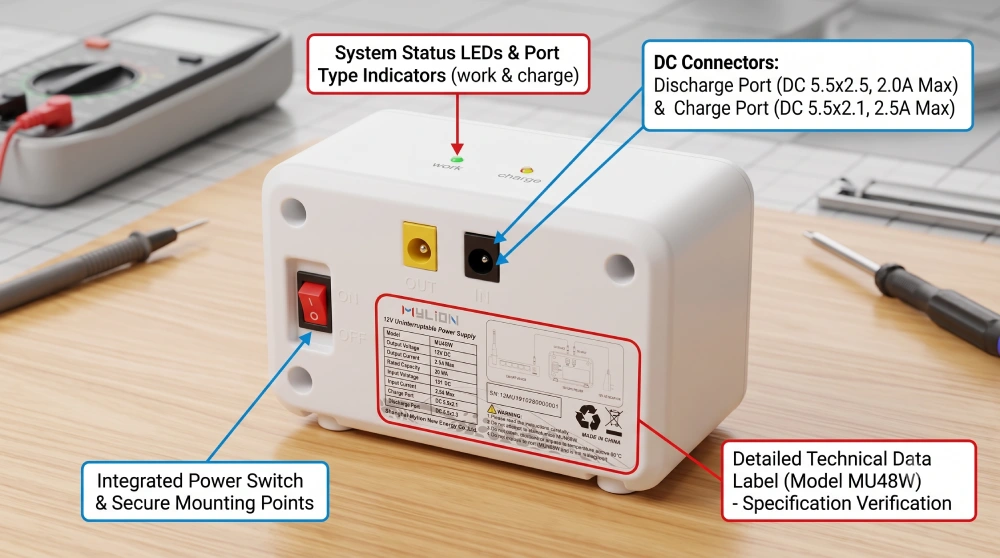
Passaggio 3: simulare il normale carico di rete
Scollega l'UPS dalla presa di corrente a muro. Annota l'ora esatta.
Dettaglio cruciale: non lasciare la rete inattiva. L'hardware di rete consuma molta più energia quando elabora pacchetti di dati di grandi dimensioni. Per simulare un carico di lavoro giornaliero accurato:
- Riproduci in streaming un video 4K o esegui un test ping continuo su un computer connesso.
- Avviare il download di un file di grandi dimensioni.
- Assicurati che più dispositivi (telefoni, laptop, hub per la casa intelligente) rimangano connessi al Wi-Fi.
Fase 4: Monitorare, registrare e valutare
Lascia che i dispositivi funzionino esclusivamente a batteria finché la rete non si interrompe. Annota l'ora esatta in cui il router si spegne.
Confrontate il tempo di funzionamento effettivo con il calcolo teorico. In molti casi, il tempo reale supererà effettivamente il tempo teorico calcolato utilizzando i dati riportati sull'etichetta dell'alimentatore, perché il router raramente assorbe la sua corrente massima nominale.
Fattori chiave che influenzano il tempo di backup effettivo del tuo UPS
Se i risultati dei test fisici differiscono notevolmente dai calcoli, è probabile che siano in gioco diverse variabili.
1. Capacità della batteria
Il fattore determinante fondamentale. Confrontare sempre in Wh, non solo in mAh o Ah.
2. Potenza di carico del dispositivo
I diversi dispositivi consumano energia in modo molto diverso: un ONT di base può assorbire 2 W, mentre un router aziendale ne assorbe 25 W.
3. Efficienza dell'UPS
Le unità DC Mini UPS raggiungono in genere un'efficienza del 90-95%. Questa perdita di efficienza deve essere presa in considerazione nei calcoli.
4. Profondità di scarica (DoD)
Per le batterie al litio, la capacità utilizzabile non è pari a 100% della capacità nominale. Le ipotesi conservative del Dipartimento della Difesa garantiscono previsioni affidabili sull'autonomia.
5. Temperatura e ventilazione
Le prestazioni chimiche delle batterie variano a seconda dell'intervallo di temperatura. Una ventilazione insufficiente può accelerare il degrado della capacità durante la scarica.
6. Età della batteria
La durata della batteria diminuisce con l'invecchiamento. Effettuate dei test con batterie nuove per stabilire un valore di riferimento, ma tenete conto del degrado che si verificherà durante l'intero ciclo di vita del prodotto.
Come MYLION Mini UPS supporta le applicazioni di backup per le telecomunicazioni
Per gli operatori di telecomunicazioni, gli ISP e le aziende produttrici di apparecchiature di rete, una soluzione Mini UPS affidabile richiede più della semplice capacità della batteria. Le soluzioni Mini UPS MYLION sono progettate per router, ONT, ONU, CPE, gateway e altri dispositivi di comunicazione alimentati in corrente continua, contribuendo a ridurre le interruzioni di servizio causate da guasti di corrente.
I principali vantaggi includono:
- Progettazione con tempo di trasferimento pari a zero millisecondi: Consente una commutazione di alimentazione senza interruzioni, contribuendo a mantenere il funzionamento del dispositivo durante le interruzioni di corrente.
- Chimica avanzataUtilizza tecnologie di batteria e sistemi di protezione adeguati per garantire prestazioni di backup affidabili e un funzionamento a lungo termine.
- Uscita multi-dispositivo: Supporta configurazioni flessibili per applicazioni che richiedono alimentazione di backup per più dispositivi connessi, come combinazioni di ONT e router.
- Sicurezza sovradimensionata: Garantisce un margine di potenza adeguato e una progettazione dei sistemi di protezione per migliorare l'affidabilità del sistema e ridurre i rischi operativi.
- Una varietà di prodotti con durata di backupS: Offre diverse opzioni di capacità e configurazione per soddisfare i vari requisiti di tempo di backup per reti domestiche, implementazioni ISP e applicazioni di telecomunicazione.
MIO LEONE Modello Mini UPS | Capacità della batteria | Tempo di backup: 6W Load (Router base) | Tempo di backup: 18Carico W (Router + ONT) | Tempo di backup: 24Carico W (configurazione ad alto traffico) |
77,7 Wh | Circa 10 ore | Circa 5 ore | Circa 3 ore | |
44,4 Wh | Circa 7 ore | Circa 3 ore | Circa 2 ore | |
29,6 Wh | Circa 4 ore | Circa 1 ora e mezza | Circa 1 ora |
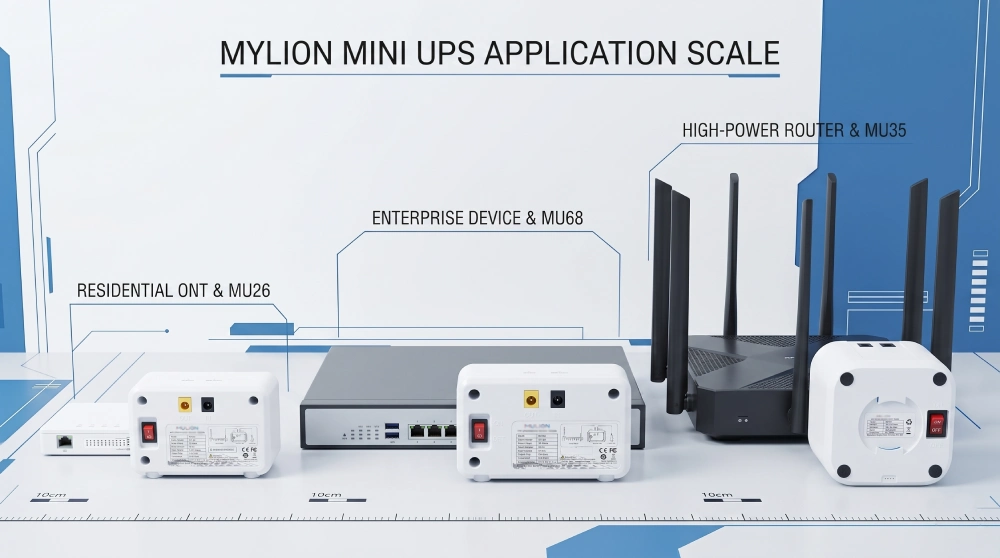
MYLION supporta i clienti dalla valutazione delle applicazioni e dall'abbinamento dei prodotti fino ai test dei campioni e all'implementazione dei progetti, contribuendo a creare soluzioni di backup affidabili per le telecomunicazioni.
Domande frequenti
D1: Perché non dovrei usare l'etichetta dell'alimentatore per calcolare il tempo di backup?
D2: Qual è la differenza tra Ah e Wh?
D3: Quante volte devo ripetere un test del tempo di backup?
D4: Cosa devo fare se il risultato del test sul campione non è quello previsto?
D5: Come garantisce Mylion la precisione dei tempi di backup?
D6: Il Mylion Mini UPS è in grado di alimentare più dispositivi contemporaneamente?
Conclusione
Per gli operatori di telecomunicazioni, i provider di servizi Internet e i produttori di apparecchiature di rete, una validazione accurata del tempo di backup contribuisce a garantire che le soluzioni Mini UPS soddisfino i requisiti di implementazione reali e supportino la continuità dei servizi di rete.
MYLION fornisce Soluzioni Mini UPS Per applicazioni di comunicazione e di rete alimentate in corrente continua, aiutiamo i clienti B2B a valutare la compatibilità dei dispositivi, a convalidare le prestazioni del backup e a sviluppare soluzioni di alimentazione di backup affidabili.

 Italiano
  English
  简体中文
简体中文  Deutsch
  Français
  Español