
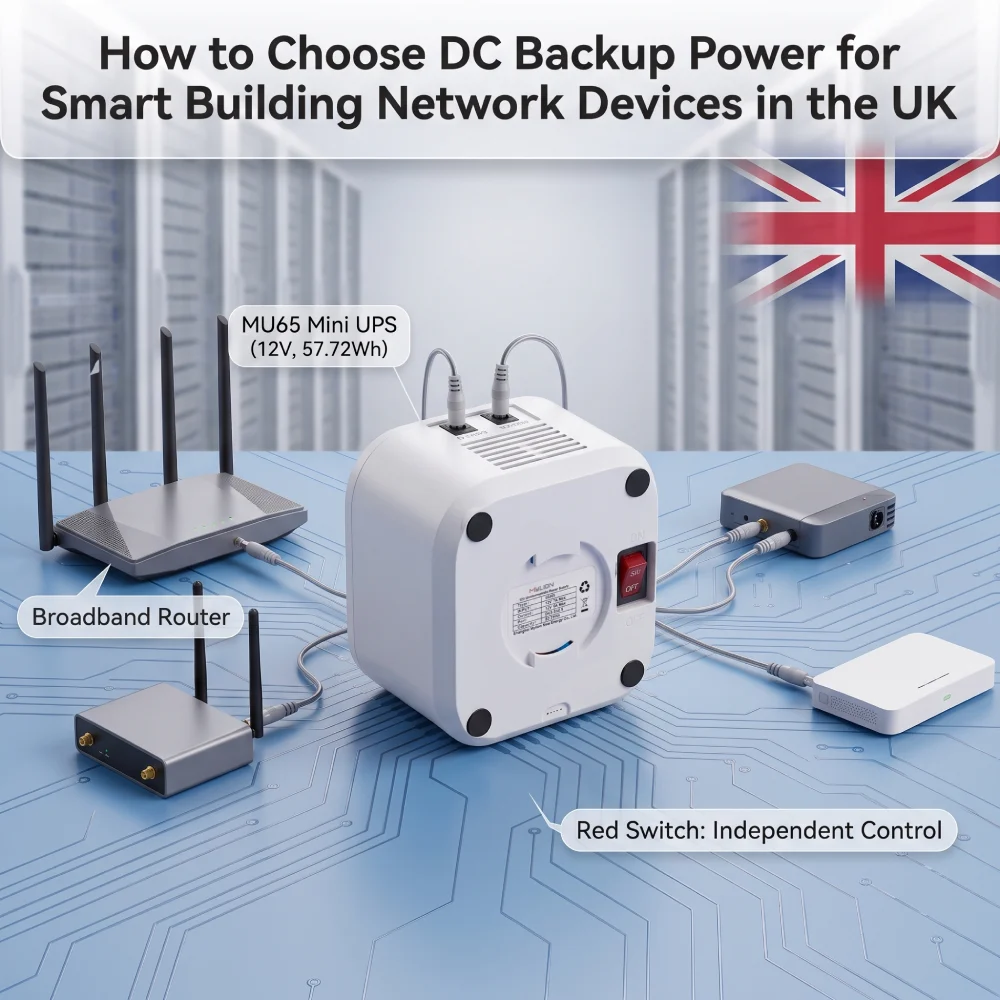
Alimentation de secours CC pour les dispositifs de réseau des bâtiments intelligents permet de maintenir en ligne les routeurs, les passerelles, les CPE et autres équipements réseau basse tension lors des coupures de courant.
Pour les intégrateurs de systèmes et les fournisseurs de solutions réseau britanniques, le principal défi consiste à choisir l'architecture de sauvegarde adaptée à chaque appareil.
Les onduleurs centraux (CA), les onduleurs industriels (CC) et les mini-onduleurs (CC) répondent à des besoins différents. Le choix du modèle approprié dépend de la tension de l'appareil, de la charge, du type de connecteur, de l'autonomie requise et de l'environnement d'installation.
Ce guide explique comment les évaluer et comment choisir un modèle approprié. solution d'alimentation de secours CC pour les dispositifs de réseau de bâtiments intelligents.
Pourquoi l'alimentation de secours est importante pour l'infrastructure réseau des bâtiments intelligents
Un bâtiment moderne peut contenir de nombreux appareils connectés répartis sur différentes zones et à différents emplacements d'équipements.
Selon le projet, cela peut inclure :
- Routeurs et passerelles haut débit
- CPE sans fil
- Passerelles réseau
- petits commutateurs réseau
- passerelles de communication IoT
- Terminaux du réseau de vidéosurveillance
- Dispositifs de surveillance IP sélectionnés
- Autres équipements de communication basse tension
Les recommandations du gouvernement britannique concernant les immeubles partagés illustrent à quel point les bâtiments modernes dépendent des infrastructures réseau, notamment des connexions WAN, des CPE, des LAN, des commutateurs et des réseaux sans fil.
Une connexion réseau fiable ne garantit pas la continuité du service en cas de coupure de courant du périphérique local.
C’est pourquoi la résilience des réseaux de bâtiments intelligents doit inclure à la fois :
- Disponibilité du réseau
- continuité de l'alimentation au niveau de l'appareil
Qu'est-ce que l'alimentation de secours CC au niveau de l'appareil ?
L'alimentation de secours au niveau de l'appareil fournit directement l'énergie de la batterie à un appareil basse tension individuel ou à un petit groupe d'appareils.
Par exemple, un onduleur CC compact peut être installé entre la source d'alimentation normale et un routeur ou une passerelle.
En fonctionnement normal, l'appareil utilise l'alimentation secteur. En cas de défaillance de cette alimentation, l'onduleur prend le relais pour alimenter les équipements connectés.
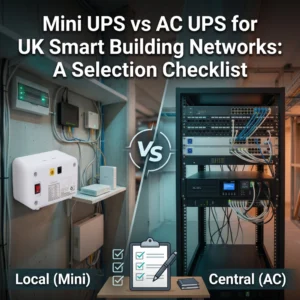
Cela diffère d'un système d'alimentation sans coupure (UPS) central qui protège un rack, une armoire ou un groupe d'appareils alimentés en courant alternatif.
Pour les applications réseau basse consommation appropriées, l'alimentation de secours CC au niveau du périphérique peut offrir plusieurs avantages pratiques :
- Installation compacte à proximité de l'équipement
- Capacité de sauvegarde adaptée à la charge réelle de l'appareil
- Assistance directe pour les équipements alimentés en courant continu
- Déploiement simplifié sur les points de terminaison du réseau distribué
- Sauvegarde indépendante pour certains appareils critiques
- Remplacement ou extension flexible lors des futures mises à niveau du réseau
Cependant, un Mini-onduleur CC n'est pas automatiquement la solution adaptée à tous les systèmes de bâtiments intelligents.
Comprendre les différentes architectures de sauvegarde est donc la première étape.
Onduleurs CA vs Onduleurs CC industriels vs Mini-onduleurs CC
La meilleure architecture de sauvegarde dépend de l'équipement, des besoins en énergie et de l'environnement d'installation.
Onduleur de climatisation centrale
Un onduleur AC traditionnel peut prendre en charge plusieurs appareils alimentés en courant alternatif ou des groupes d'équipements plus importants.
Cette approche peut convenir pour :
- Salles de réseau
- racks d'équipement
- Serveurs
- Interrupteurs plus grands
- Plusieurs charges CA
- Infrastructure de bâtiment centralisée
Son avantage réside dans la protection centralisée.
Cependant, l'utilisation d'un onduleur central CA uniquement pour un petit terminal alimenté en CC peut entraîner une chaîne de conversion de puissance plus complexe et une installation plus importante que ce que requiert l'appareil individuel.
Onduleur CC industriel
Les systèmes d'alimentation sans coupure (UPS) CC industriels sont couramment utilisés avec l'automatisation, les panneaux de commande et l'infrastructure industrielle 24 V CC.
Par exemple, la gamme d'onduleurs CC de Phoenix Contact au Royaume-Uni comprend des solutions d'onduleurs CC 24 V montées sur rail DIN, conçues pour les systèmes d'alimentation industriels.
Ces systèmes peuvent convenir aux bâtiments qui utilisent déjà :
- Armoires de commande 24V
- équipement sur rail DIN
- Systèmes d'automatisation
- Infrastructure PLC
- Distribution CC industrielle centrale
Il ne faut pas les confondre avec les produits Mini UPS compacts de niveau appareil.
Mini-onduleur CC
Un mini-onduleur CC est généralement plus adapté aux applications nécessitant un réseau ou un dispositif de communication relativement petit fonctionnant à partir d'une entrée CC définie.
Les candidats types pour un projet peuvent inclure des éléments compatibles :
- Routeurs
- Passerelles
- CPE
- Équipement ONT ou ONU
- petits appareils de réseau
- terminaux de communication
- Passerelles IoT sélectionnées
Le principal avantage est que le système de secours peut être déployé au plus près de la charge réelle sans avoir à construire une architecture UPS centrale plus importante autour d'un seul appareil basse tension.
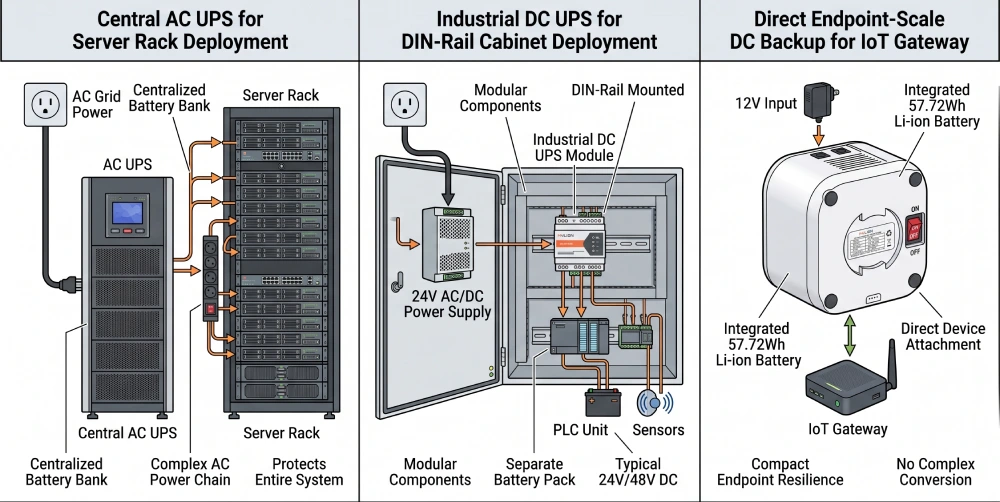
Quelle option choisir ?
Il n'existe pas d'onduleur idéal pour tous les bâtiments intelligents.
Exigence | Direction typique de sauvegarde |
Plusieurs appareils ou racks de climatisation | Onduleur de climatisation centrale |
armoires de commande industrielles | Onduleur CC industriel |
Dispositifs de réseau basse tension distribués | Mini-onduleur CC |
Applications à plus grande capacité ou spécialisées | Système de sauvegarde spécifique au projet |
La sélection doit commencer par l'appareil connecté, et non par le type d'onduleur.
Commencez par les exigences relatives à l'appareil
Une erreur fréquente dans le choix d'une alimentation de secours consiste à commencer par la capacité de la batterie.
Pour les projets B2B, commencez par les exigences électriques du périphérique réseau.
1. Tension d'entrée
Vérifiez l'adaptateur secteur de l'appareil ou la documentation technique.
Les périphériques réseau classiques peuvent utiliser différentes architectures d'entrée, telles que :
- 12 V CC
- 24 V CC
- 48 V CC
- Alimentation USB-C
La puissance de sortie de l'onduleur doit correspondre aux exigences de l'appareil.
Une batterie plus grosse ne résout pas un problème de tension.
2. Courant ou puissance de fonctionnement
L'onduleur doit supporter la charge de fonctionnement réelle.
Deux appareils peuvent tous deux utiliser une tension de 12 V, mais nécessiter des niveaux de courant très différents.
Vérifier:
- Courant d'entrée
- Consommation d'énergie
- exigences de charge maximale
Ne choisissez pas un onduleur uniquement en fonction de la tension.
3. Connecteur d'alimentation
La compatibilité électrique inclut l'interface physique.
Les équipes de projet doivent vérifier si l'appareil utilise :
- Connecteur cylindrique CC
- USB-C
- Connexion terminale
- Une autre interface propriétaire ou spécifique au projet
La polarité et les dimensions des connecteurs doivent également être vérifiées avant le déploiement.
4. Durée de sauvegarde requise
La durée d'exécution de la sauvegarde doit être définie en fonction de l'objectif opérationnel.
Par exemple, un projet peut avoir besoin de suffisamment de sauvegarde pour :
- coupures de courant brèves sur le pont
- Maintenez la connectivité pendant le démarrage d'une autre source d'alimentation
- Assurer la continuité du réseau pendant une panne prolongée
- Maintenir les points de terminaison sélectionnés opérationnels pendant une période de service prédéfinie
L'autonomie doit donc être calculée à partir de la charge de l'appareil connecté et de l'énergie utilisable de la batterie, plutôt que d'être estimée uniquement à partir de la capacité en Ah de la batterie.
5. Environnement d'installation
Une unité de secours pour une armoire de communication intérieure n'a pas nécessairement les mêmes exigences qu'une unité installée dans un endroit isolé ou exposé.
Considérer:
- installation intérieure ou extérieure
- Espace de montage disponible
- Température ambiante
- Ventilation
- Cheminement des câbles
- Accessibilité pour la maintenance
- exigences en matière de protection de l'environnement
Utilisez les produits uniquement dans les conditions d'installation spécifiées.
12 V, 24 V, 48 V ou USB-C : quelle option convient le mieux à votre projet ?
Les équipements réseau des bâtiments intelligents n'utilisent pas une tension standard. C'est pourquoi les spécifications de l'appareil doivent précéder le modèle d'onduleur.
Alimentation de secours 12 V CC
La tension de 12V est courante parmi de nombreux routeurs, passerelles et appareils de communication.
Pour un appareil 12 V compatible, l'intégrateur doit confirmer :
Tension → courant requis → connecteur → durée de l'autonomie → conditions d'installation
avant de choisir une unité de secours.
MYLION propose différentes options de mini-onduleurs 12V pour les applications réseau.
Appareils 12V de puissance supérieure
Certaines passerelles, certains routeurs avancés et certains CPE nécessitent une capacité de sortie supérieure à celle des équipements réseau de base à faible consommation.
Dans ces cas-là, utiliser un mini-onduleur standard à faible courant simplement parce qu'il fournit du 12V serait inapproprié.
MYLION positionne le MU35W au sein de sa gamme de solutions de secours réseau haute puissance 12V, avec une configuration de sortie maximale publiée de 12V/5A.
La compatibilité réelle des appareils doit encore être vérifiée avant le déploiement du projet.
Périphériques réseau USB-C PD
Certains routeurs, passerelles et CPE plus récents utilisent l'alimentation USB-C.
La compatibilité USB-C ne dépend pas uniquement du connecteur. Le profil d'alimentation PD requis doit également correspondre.
MYLION's MUC85 est positionné comme un solution de sauvegarde USB-C PD pour les routeurs, passerelles et CPE compatibles, la page produit actuelle spécifiant une entrée/sortie USB-C PD jusqu'à 65 W.
Pour l'évaluation du projet, les exigences en matière de puissance dissipée (PD) du dispositif connecté doivent être confirmées avant la sélection.
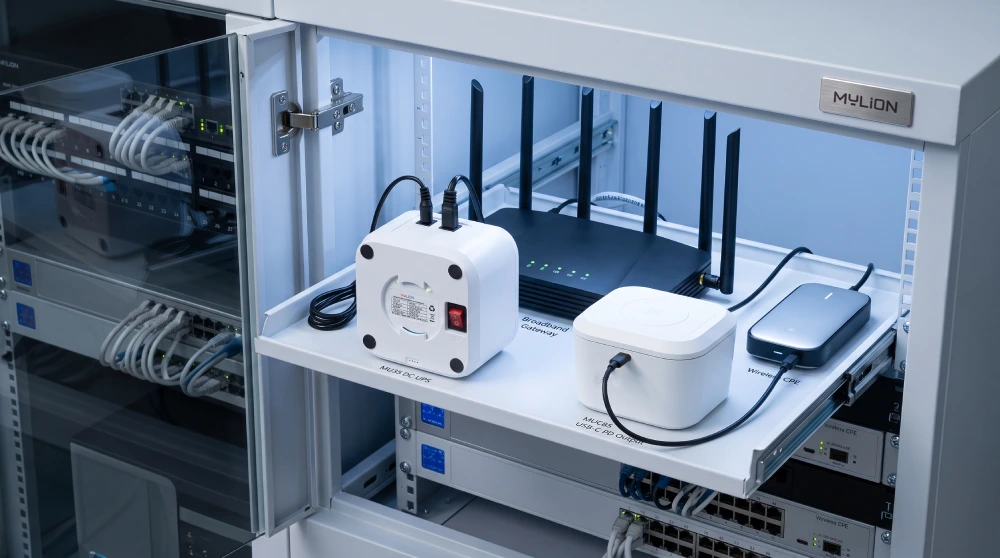
Équipements réseau 24 V et 48 V
Certains équipements CPE sans fil, radios, ponts et équipements de réseau spécialisés utilisent du 24V ou du 48V.
Ces applications nécessitent une solution de sauvegarde différente de celle proposée par les routeurs 12V standard.
MYLION positionne le MU248 pour certaines applications de télécommunications et de réseaux 24 V et 48 V.
Où peut s'intégrer un mini-onduleur CC dans un bâtiment intelligent ?
Un mini-onduleur CC ne doit pas être considéré comme un substitut au système d'alimentation de secours complet du bâtiment.
Son rôle est généralement plus spécifique :
Fournir une sauvegarde locale pour les périphériques réseau distribués compatibles.
Les applications typiques peuvent inclure :
Équipements haut débit et de périphérie WAN
Un routeur, une passerelle, un ONT ou un CPE peuvent faire partie de la connexion entre un bâtiment et un réseau de communication externe.
La mise en place d'une alimentation de secours locale adéquate peut contribuer à éviter qu'une coupure de courant locale ne désactive immédiatement le terminal.
Passerelles de réseau distribué
Un bâtiment intelligent peut utiliser des passerelles pour connecter des systèmes ou des appareils distants à un réseau central.
Lorsque ces passerelles utilisent une alimentation CC basse tension compatible, une alimentation de secours locale peut être évaluée dans le cadre de la conception de la résilience du réseau.
Équipement de réseau sans fil
Certains équipements CPE sans fil et de communication peuvent être déployés à l'écart de la salle de communication principale.
Une solution de secours distribuée peut s'avérer plus pratique que d'étendre un circuit d'alimentation sans coupure centralisé à chaque point d'extrémité.
Équipement de réseau de petite taille
Certains commutateurs, terminaux de communication et autres équipements réseau peuvent également convenir à une alimentation de secours en courant continu.
La compatibilité doit toujours être vérifiée par rapport aux spécifications réelles de l'appareil.
Options de sauvegarde MYLION DC pour les projets réseau
MYLION développe Mini-onduleurs et solutions de secours CC pour les applications de télécommunications, de FAI et de déploiement de réseaux.
Différents modèles répondent à différentes exigences en matière de tension, de puissance et d'interface.
Exigences du projet | Direction MYLION |
Dispositif réseau 12V compatible standard | Onduleur CC mini MU68 |
Équipement 12V compatible de puissance supérieure | Onduleur CC mini MU35 |
périphérique réseau USB-C PD | Mini-onduleur MUC85 |
Équipements réseau 24 V / 48 V sélectionnés | MU248 |
Autres exigences spécifiques au projet | Évaluation du modèle / solution personnalisée |
Ces exemples doivent être traités comme des indications de sélection, et non des affirmations de compatibilité universelle.
Pour chaque projet de réseau de bâtiment intelligent, il convient d'examiner en premier lieu la tension, le courant, le connecteur, la durée de fonctionnement cible et l'environnement d'installation de l'appareil.
FAQ
Q1 : Quelle est la meilleure option d'alimentation de secours CC pour les appareils de réseau des bâtiments intelligents ?
Q2 : Un mini onduleur CC peut-il être utilisé pour un routeur ou une passerelle dans un bâtiment intelligent ?
Q3 : Dois-je choisir un onduleur 12 V ou 24 V CC ?
Q4 : Un seul onduleur CC peut-il alimenter plusieurs périphériques réseau ?
Q5 : Un système de secours CC est-il plus adapté qu'un système d'alimentation sans coupure CA pour les équipements réseau ?
Q6 : Quelles informations un intégrateur de systèmes doit-il fournir avant de sélectionner un mini-onduleur ?
Q7 : MYLION peut-il prendre en charge l’évaluation des projets avant leur déploiement à grande échelle ?
Conclusion
L'alimentation de secours pour un bâtiment intelligent ne doit pas être considérée comme le choix d'un seul produit. Différentes parties du bâtiment peuvent nécessiter des architectures de résilience différentes.
Les systèmes d'alimentation sans coupure (ASI) à courant alternatif central peuvent protéger des groupes d'équipements importants. Les systèmes d'alimentation sans coupure (ASI) à courant continu industriels peuvent prendre en charge l'infrastructure de contrôle et d'automatisation.
Solutions d'alimentation sans coupure (UPS) mini CC Il peut alimenter certains terminaux réseau basse tension, tels que les routeurs, passerelles, CPE et dispositifs de communication compatibles. Pour une infrastructure réseau distribuée, il peut en résulter une solution de secours compacte pour réseau continu, plutôt qu'un système d'alimentation sans coupure (UPS) central classique.

 Français
  English
  简体中文
简体中文  Deutsch
  Italiano
  Español